
99Exch Login — Official Way to Log In Again After Twenty Idle Minutes
A 99Exch session on the web lets go after twenty minutes of you doing nothing, and the app stretches that to forty five. This page covers the two boxes on the sign-in screen, the tick underneath them, and the shortest route back in when the clock runs out in the middle of an over.
Inside the 99Exch Login Boxes: Clear Limits on Length and Case
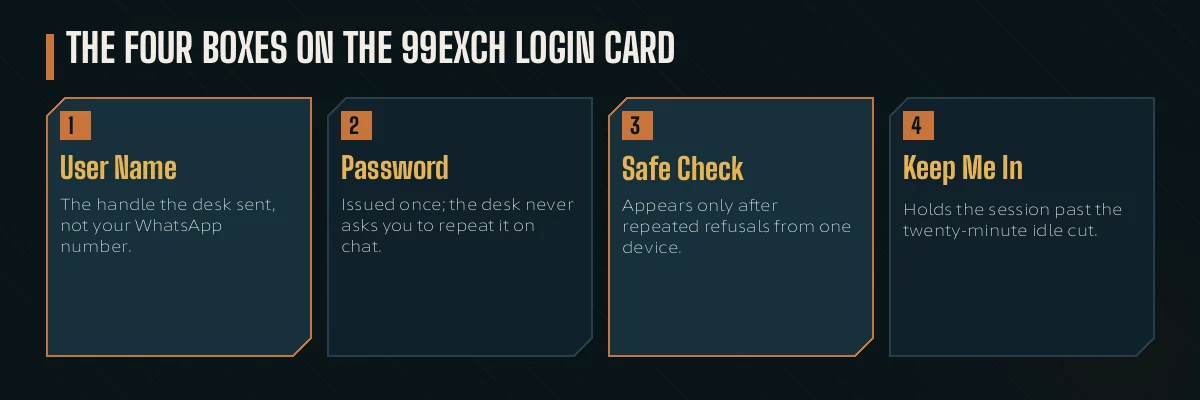
Two boxes and a tick. That is the whole 99Exch login screen, and the top box is fussier than most people expect it to be.
The username box accepts four to fourteen characters, letters and digits only, which rules out the dot-and-underscore habits most of us carry over from email. Spaces are refused outright. If the 99Exch desk issued you something like ravi7kolkata, that exact string is what belongs in the box, with no capital R added by a phone keyboard that thinks it is being helpful. Both Android and iOS auto-capitalise the first letter of an ordinary text input, and that single stray capital is the most common reason a perfectly correct username bounces.
Below it, the second box holds a string you never picked. The 99Exch desk wrote it, so a lowercase k where they sent K is enough to fail. There is no hint under that box, and no reminder question either.
Under both boxes sits the stay-signed-in tick, and it does less than its name suggests. Ticking it asks your browser to remember the 99Exch username on that one device so the top box fills itself next visit. It does not extend the twenty-minute idle window. Not by a second. The password is never kept by the tick either, which is why the lower box is still empty when you come back to a device that remembers you.
- Username box
- Four to fourteen characters, letters and digits only, no spaces or symbols, exactly as the 99Exch desk issued it.
- Password box
- Desk-issued string, case-sensitive end to end, with no self-service hint offered on this screen.
- Stay signed in
- Remembers the username on that one device; the twenty-minute idle limit is untouched by it.
- Sign-in control
- One press. A matched pair puts you on the live board, a mismatch returns the same screen for a second attempt.
What the 99Exch sign-in screen never asks for
No email address. No one-time code to a phone. No date of birth, no PAN, no second password for withdrawals at this point in the journey. Everything the desk needed from you was collected once, during the four-step sign-up, and the screen you are looking at only ever matches a pair it already holds. If something claiming to be 99Exch demands an OTP before letting you in, you are not on an address from the real set.
Copy-paste is the quiet culprit on this card. A username lifted from a WhatsApp bubble often carries one blank character after the last digit, the top box shows nothing odd, and the server still reads ravi7kolkata-plus-a-space as a stranger. Typing those four to fourteen characters by hand costs ten seconds. Where the username came from in the first place is a separate errand, and the four-step 99Exch sign up that issues one starts with your name and your WhatsApp number before ending with a first deposit confirmation.
Length is where the edge cases show up. A four-character username is legal though rare, fourteen is the ceiling, and anything longer than that sitting in your chat thread is almost certainly two things run together: a username followed by a password. The 99Exch desk sends the two as separate lines for exactly that reason.
Order probably matters less than accuracy, though the screen reads top to bottom for a reason. Fix the username first.
99 Exchange Login: the Same Official 99Exch Sign-In, Typed in Two Steps
A 99 exchange login is the ordinary 99Exch sign-in under the brand's full name: put the username the desk issued you (four to fourteen letters and digits) in the top box, the case-sensitive password in the lower box, then press sign in. From that moment the web session runs twenty idle minutes; the app gives forty-five.
Two spellings, one account. Nobody who types 99 Exchange into a search bar is opening a separate profile, and there is no second username hiding behind the longer name.
- Step one, top box
- The issued string exactly, typed by hand so no capital letter or trailing space slips in.
- Step two, lower box
- The desk password, matched character for character, then a single press of the sign-in control.
Sometimes the problem is earlier than either box. The page simply will not load, or it hangs on a blank tab, and in practice that is almost always the address being blocked by an Indian internet provider rather than anything wrong with your details, which is why 99Exch keeps more than one official address running and why moving to another one from the dated list of working 99Exch addresses brings back the same two boxes, the same ID and the same balance you had before the block.
Retrying a 99 exchange login on an address that will not open is wasted effort. Switch address first.
Then, if the screen opens but still turns you away, the cause sits in the pair itself (a stray capital is the usual culprit), and the fixes for that sit in the refused-details section near the end of this page.
Twenty Idle Minutes, the Real Clock Behind a 99Exch Login on the Web
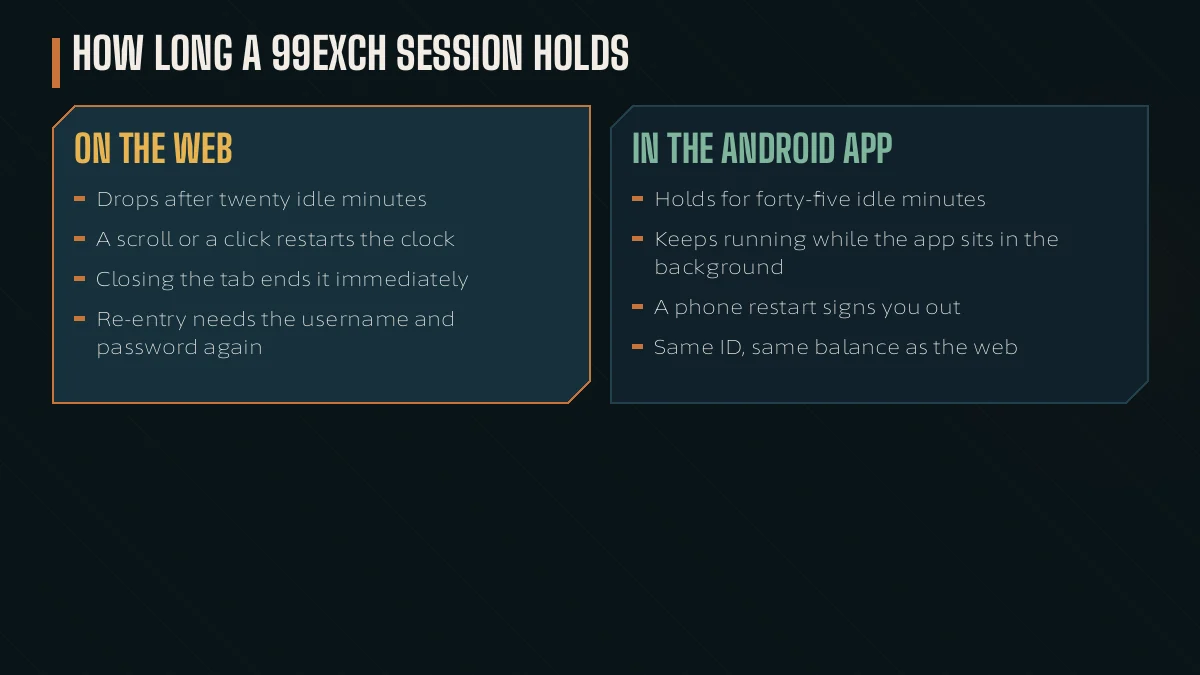
Idle means idle in the literal sense: no typing, no tapping, no clicking from you. Twenty minutes of that and the browser session closes itself, and the 99Exch sign-in screen is back where the board used to be.
What confuses people is the live board. Prices on it move every eight seconds all on their own, so the screen in front of you looks busy while your own activity counter sits at zero, and that mismatch between a moving screen and a dead session is where most of the surprise logouts come from. The board refreshing is the board working, not you working.
Picture a Sunday-night chase. You back a session price in the fourteenth over, the covers come on, and you watch twenty-two minutes of rain analysis without touching the glass. When you reach for the bet slip at the restart, the 99Exch login screen is waiting instead, and the price you wanted has moved on. That is not a fault; its the idle rule doing exactly what it was set to do.
What counts as activity on a 99Exch session
- Jumping from cricket to kabaddi, or flipping a 99Exch match from match odds to fancy.
- Scrolling or filtering the match list rather than letting it refresh by itself.
- Typing a stake, even one you delete again before placing it.
- Opening My Account, the statement, or anything that asks the server a question.
- Placing or cancelling a bet, which is the obvious one.
A timeout is a screen-level event and nothing more. Your 99Exch balance, your matched bets, your statement and your deposit history all live on the server rather than in the window you lost, so signing back in shows you the same account you left, down to the last rupee.
Each fresh sign-in starts a brand new twenty-minute count. There is no daily cap on how often you may do it and no cooling-off period between attempts made with correct details. Short and dull, which is how a session rule should be.
The twenty-minute figure is the web number and it does not shift by sport, by market type or by how much is sitting in the account. People assume it scales with activity or balance, then plan around a rule that was never there.
If you watch long formats, a small nudge every quarter of an hour is enough: open another sport, scroll the list, type a stake and clear it. That is the whole trick to keeping a 99Exch login alive through a Test session.
Forty-Five Idle Minutes: Why a 99Exch Login Holds Longer in the Official App
The Android app runs a longer leash. Forty-five idle minutes instead of twenty.
Everything else about the sign-in is identical: same username, same case-sensitive password, same balance, same statement. The app simply assumes you are holding a phone you own and that putting the screen away for half an hour is normal behaviour, rather then a sign that somebody walked off from a shared machine in a shop.
Inside, the sign-in sits in front of everything the 99Exch app holds, which means moving between its parts never asks for the pair a second time. One entry, then the whole app.
- Browser session
- 20 idle minutes on any device, including a home-screen shortcut on an iPhone.
- Android app session
- 45 idle minutes, and the keyboard usually comes up on the username box when it does expire.
- Shared or borrowed device
- Leave the tick off; the shorter browser window is the safer default of the two.
The build itself is small: twenty-two megabytes, Android 7.0 or newer, four steps from download to signed in, and a new build landing roughly every three weeks. The install sequence in order, the unknown-sources step and the Android floor are written out on the 22 MB 99Exch APK build page rather than repeated here.
On an iPhone the clock is twenty minutes, full stop. That icon on the home screen launches Safari with a 99Exch address inside it, so it inherits the web timeout rather than the forty-five minute window that only the Android build carries.
Battery savers complicate it a little. Aggressive power management on some Android skins closes background apps well before forty-five minutes are up, so the 99Exch app can come back to the username box earlier than the rule promises. That is the handset, not the session limit, and whitelisting the app in your battery settings tends to stop it.
Which to use is a short argument. On a phone you own, the longer window is the better experience; on a borrowed laptop the shorter one is the sensible default, and the 99Exch login itself is the same pair of boxes either way.
Quick Way Back When a 99Exch Login Drops Mid-Chase
The route back is short enough to finish during a drinks break.
- 1
Open the 99Exch address you normally use. Every address in the set carries the same ID and the same balance, so there is no wrong one to pick.
- 2
Type the username into the top box and check that the first character has not been capitalised for you by the keyboard.
- 3
Type the password underneath. Capitals are part of it, so a shift key in the wrong place is the same as a wrong password.
- 4
Leave the stay-signed-in tick alone unless the phone belongs to you and nobody else picks it up.
- 5
If the pair is refused twice, message the 99Exch desk from the number you registered with. Replies run around four minutes on median and the desk is awake from 9 AM to 2 AM IST, seven days a week.
Done properly the whole loop takes under a minute, and the the market you were watching is usually still there when you arrive.
What you do not need is a new account. A fresh 99Exch ID takes six to nine minutes through the desk, fifteen on a crowded international night, and none of that applies to a session that merely timed out while you watched a rain delay. The username you already hold still works.
Worked example with a stopwatch on it. The session dies at 9:41 during an innings break, you reopen the address at 9:42, the username takes maybe eight seconds to type properly and the password another ten, and you are back on the 99Exch board by 9:43 with a fresh twenty minutes in hand. The only version of this that runs long is the one where the password has genuinely changed, and that is a desk job of about three minutes rather than a retyping job.
A part-typed bet slip is the one thing that does not survive. Stakes you had keyed in but never placed go with the window, which is a decent argument for placing in two smaller pieces during a tense chase instead of nursing one big slip through a break.
Minimum deposit on the account is ₹100 and minimum withdrawal is ₹500. Neither has anything to do with signing in, and a timeout does not reset a limit, cancel a matched bet or hold up a withdrawal that was already moving.
An address that refuses to load at all is a different complaint from a refused pair. Indian networks filter betting domains at the ISP layer, so one of the brand addresses can go dark for a week while the rest answer normally. Your 99Exch username, your balance and your twenty-minute clock travel to whichever one opens.
Refused 99Exch Login Details Go Straight to the Desk for a Fast Three-Minute Repair
Three things cause most refusals. Only one of them needs a human.
Stray capitals and copied spaces on a 99Exch login
The first two are yours to fix in about ten seconds: a capitalised first letter on the username, or an invisible space picked up when the password was copied out of a chat. Retype both by hand, slowly, and the 99Exch login normally goes through on the next press. If it does not, try once more on a fresh screen before messaging anyone, because two clean attempts tell the desk far more than five frantic ones.
A password that genuinely no longer works
The third needs the desk. Password resets on 99Exch are desk-side rather than self-service, so there is no link on the sign-in screen that mails you a code and no automated flow sitting behind it. You message, they reset, and the turnaround runs about three minutes. The full reset sequence, including what happens to an account locked after repeated wrong attempts, lives on the 99Exch com login password reset page.
A username nobody can remember
Recovery is a short conversation with proof attached. Message from the number the account was registered on and quote the amount of your last deposit; that pair is what the desk matches you against. One registered number carries a maximum of two 99Exch IDs, which is exactly why the number you message from matters more than the name you give. ID types, the multiple-ID rule and the recovery steps in order sit on the 99Exch ID and recovery page.
- Desk reply
- Between 9 AM and 2 AM IST the typical wait for a first answer is near four minutes, weekends included.
- Password reset
- Three minutes, give or take, and only after you have written in; this sign-in card has no reset of its own.
- Brand-new ID
- Usually ready inside nine minutes (six at best), though a crowded evening can push it toward fifteen.
- Display number
- +91 81097 11726 is shown as plain text only; send to it from the phone the account sits on.
Late hours are most of the point. A night Test or a 2 AM European tie is exactly when a 99Exch login tends to fail, and a desk that shut at six in the evening would be useless to anybody watching one.
All of the above assumes the details were right once. If no 99Exch login has ever been issued to you, there is nothing to repair yet and the sign-up errand comes first.
99Exch Login Doubts Answered: Six Quick Replies the Desk Repeats Daily
How do I log in to 99Exch?
Two entries and one press. The upper box takes your desk-issued 99Exch username of four to fourteen letters and digits, the lower one takes the password exactly as sent, capitals included, and the sign-in control does the rest. No OTP or email follows; a matching pair lands you on the board.
How long does a 99Exch login stay open on the web?
Twenty minutes of complete inactivity, then the browser session ends and the sign-in screen comes back. Any real input from you restarts that clock. The price refresh you see on the live board does not count, because the board updates itself every eight seconds whether you are there or not.
Why does 99Exch sign me out during a match?
Because nothing was typed, tapped or clicked for twenty minutes. Rain breaks, innings changes and long phone calls all burn that window while the match looks live on screen. Signing back in with the same 99Exch username and password takes a few seconds and nothing on your account changes.
Does the stay signed in tick keep a 99Exch login open?
No. The tick only asks your browser to remember the username so the top box is prefilled next time. The twenty-minute idle limit stays exactly where it is, and the forty-five minute app limit does too. Treat it as a typing shortcut, not a longer 99Exch session.
What can a 99Exch login username contain?
Four to fourteen characters, letters and digits only. No spaces, no dots, no symbols, not even an underscore. The 99Exch desk sets it during sign-up from the name you suggest, so you cannot edit it on the sign-in screen itself. Capitals matter, so copy it exactly as the desk sent it.
Does the 99Exch app hold a login longer than a browser?
Yes, forty-five idle minutes against twenty in a browser tab. That is the only difference in the sign-in itself: same username, same password, same balance. An iPhone home-screen shortcut is still a browser, so it follows the twenty-minute rule rather than the 99Exch app rule.