
99Exch APK — Free 22 MB Download That Logs You In With Your Desk ID
Twenty two megabytes, Android 7.0 or newer, four taps that matter. Those three things decide whether the 99Exch APK will go on the phone in your hand, and the third one is where installs stall, so that is where most of this page sits. No store listing is involved anywhere.
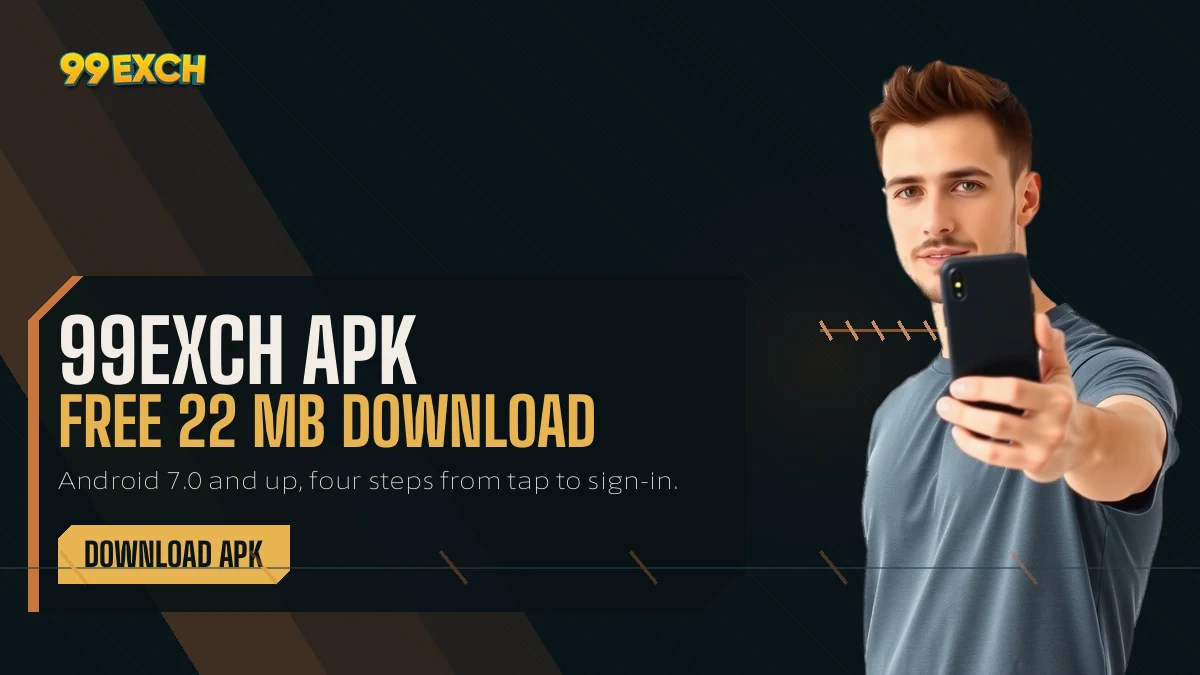
Official 99Exch APK File Sheet: 22 MB, Android 7.0, New Build Every Three Weeks
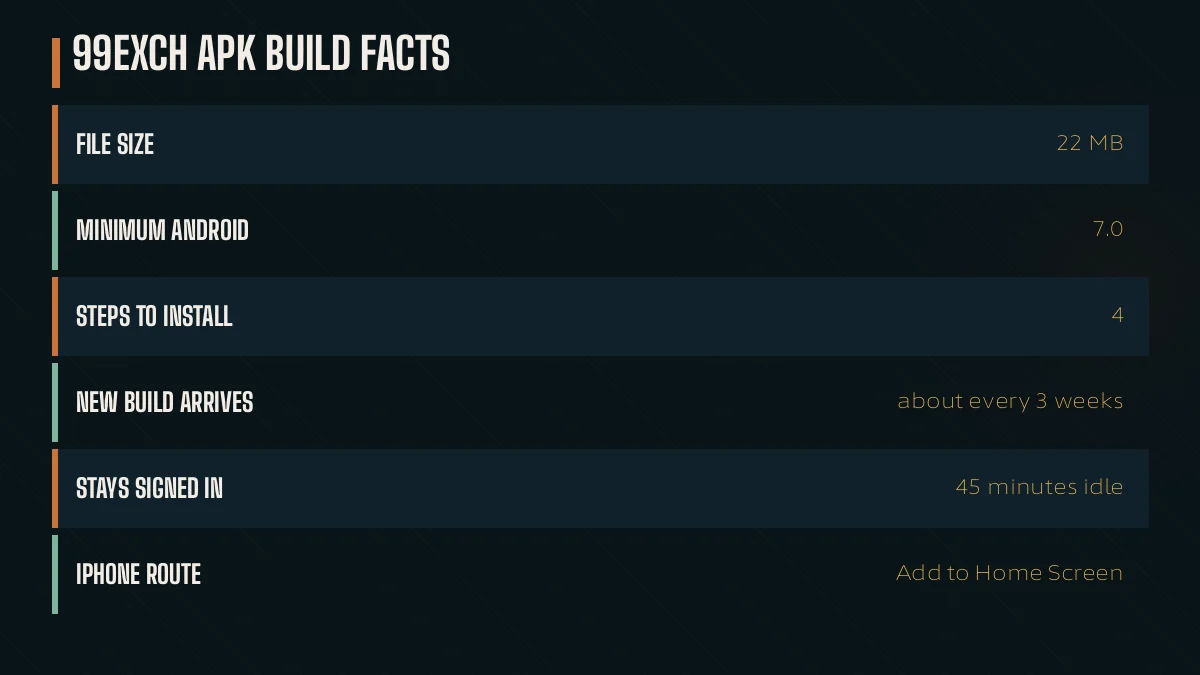
Numbers first. The 99Exch APK is a 22 MB download, it wants Android 7.0 or newer underneath it, it reaches a signed-in account in four steps, and a replacement build turns up about about every three weeks. Everything further down hangs off those four facts.
The 22 MB figure surprises people who expect a sports app to run into the hundreds. The reason is dull: almost nothing lives on the handset. Odds, market lists, game tables and your own bet history are pulled from the 99Exch servers each time a screen opens, so what installs is mostly shell and plumbing. Which also means a tired 32 GB phone has room for it without anybody deleting holiday photos first.
| Detail | What the desk ships |
|---|---|
| Download size | 22 MB |
| Minimum Android | 7.0 |
| Steps from tap to signed in | 4 |
| New build arrives | about every 3 weeks |
| iPhone or iPad | no APK, home-screen shortcut instead |
| Where the link comes from | the WhatsApp desk, 9 AM to 2 AM IST |
| Desk reply, median | 4 minutes |
One row there does more work than the rest. Android 7.0 is a hard floor rather than a suggestion: on 6.0 the installer opens, thinks about it, and refuses, which is the commonest reason a 99Exch APK install dies on a handset that has spent two years in a drawer. Not sure what yours runs? Settings, About phone, Android version. Three taps, no guessing.
Quick Phone Readiness Check Before a Trusted 99Exch APK Download
Four steps is the install itself. Before any of them, three things are better settled than discovered halfway through a 99Exch APK download, and all three take less time to check than to read about.
Storage first. The file is 22 MB, so leave a bit more than that free, because Android unpacks while it installs and a phone sitting at 99 per cent full throws an error that looks exactly like a corrupt download when it is really a space problem. Second, the Android version, for the reason in the row above. Third, where the link came from: the 99Exch APK link lands on the WhatsApp desk thread, the one that is awake from 9 AM to 2 AM IST every day, median reply four minutes. A file that reached you through a group forward or a comment section did not come from that desk, whatever the filename says.
And a fourth, strictly speaking. Have the two sign-in lines in front of you before you begin, because step four is not a form you can wander away from, and a 99Exch username is a 4 to 14 character string that nobody recalls correctly off a week-old chat. No ID at all yet? Six to nine minutes over chat gets one issued, which is the subject of 99Exch sign up in six to nine minutes.
Clear 99Exch APK Install: What Android Asks at Each of the Four Steps
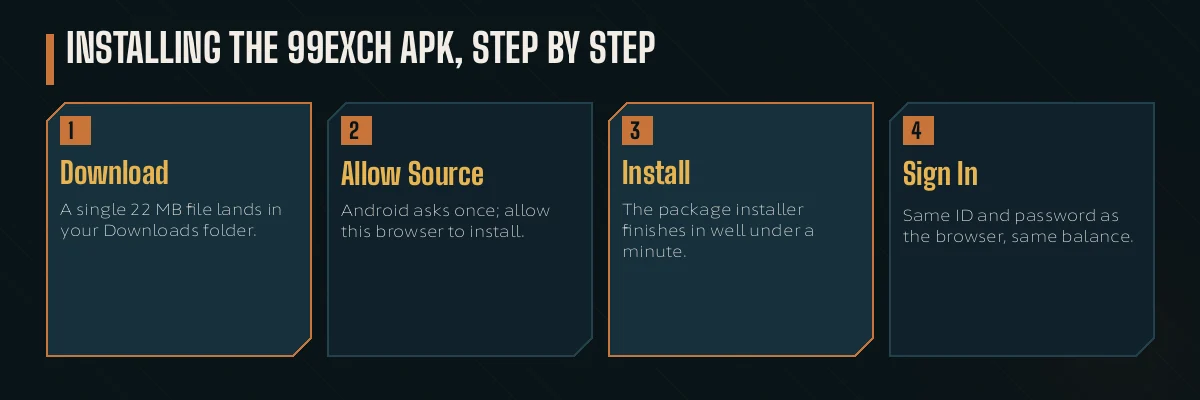
Here is the sequence with the prompt Android actually puts in front of you at each stop. Four steps, no more.
- 1
Tap the link on the desk thread. The 22 MB 99Exch file starts coming down and the browser drops a progress line into your notification shade. Let it finish completely. A half-arrived file is the single biggest cause of the parse error described two sections below, and at this size restarting the download costs seconds rather than minutes.
- 2
Allow the install from that one source. On Android 8 and up the global switch is gone; the phone asks about whichever app is handing over the file, so the request names your browser or your file manager. Android 7.0 still keeps the older single toggle under Settings and Security. Grant it, step back, and the installer picks up where it paused.
- 3
Install, then read the Play Protect note if it shows. Google scans anything arriving from outside its own store and may offer to send the file off for checking. Install anyway. This is also the step where an older 99Exch APK with a different signature causes a flat refusal, and taking the old copy off clears it.
- 4
Open the app and sign in. Username, password, done. The installed app holds a session open far longer than a browser does, and the two lines it asks for are the same pair explained on 99Exch login and the twenty minute web timeout.
Screen 1Downloading 22 MB
Screen 2Allow from this source
Screen 3Install, then install anyway
Screen 4Username and password
Timing, for anyone who likes a stopwatch on these things: the download is the only part that depends on your signal, the permission request is two taps on a modern handset, and the installer itself runs for a few seconds on a file this small. Nothing on the 99Exch route needs a laptop, a cable, or a second account.
99Exch App Download APK: the Verified Link Route With No Store Listing
Type 99exch app download apk into a search box and the results fill up with mirrors, blog posts and download farms. None of them is the desk.
There is no Play Store entry for this build, and that is nothing to do with the build. Real-money betting apps for India do not get store listings at all, so every exchange in the category hands out a file directly, which is why the request goes through WhatsApp instead: the same desk that issues IDs can see which 99Exch APK it sent you and when. The file is identical whichever address you came in through, the .com one or the .red one or the .green one, because Indian networks block betting domains at the ISP level while the ID and the balance behind every address stay the same. The address story has a page of its own: the 99 Exch Com address list.
One practical note for anyone weighing the two routes: the browser board and the app carry the same markets, the same prices and the same balance, so the 99Exch APK is a convenience and not a different product. What it adds is a shorter path, an icon instead of typing an address that may be blocked this week. For a tour of what sits inside once it is on, see the 99Exch app sections and notification detail.
Why 99Exch Black APK and Mod Builds Never Come From the Official Desk
Two phrases keep turning up beside this one: 99exch black apk and 99exch download apk mod. Neither describes anything the desk has ever sent.
There is one Android build at a time and it is not named after a colour, so a file advertised as a black edition is somebody else's repackage with a new icon and, more often than not, an advertising library bolted into it. Mod builds promise stranger things still: unlocked balances, guaranteed results, markets nobody else can see. None of that is kept on your phone to be unlocked. Prices come off the exchange servers, bets settle there, and your balance is a number on the 99Exch side of the wire that no modified installer can reach.
What a repackaged copy can do is duller and much worse. It can watch you type. A username and password entered into an unsigned build goes straight to whoever assembled it, and since one WhatsApp number carries at most two 99Exch IDs, losing the credentials on one of them is not a small inconvenience. The desk also will not troubleshoot an account that signed in through a file it did not send, which in practice means a mod costs you support as well as safety. Keep to the thread, keep the 99Exch APK the desk links, and the whole question goes away.
Safe Retry Path When Android Blocks the 99Exch APK Install
Installs fail in four recognisable ways and the message on screen tells you which one you have got. Read it before retrying.
- App not installed
- An older copy is in the way, or the new file carries a different signature from the one already on the phone. Take the existing app off, then install the 22 MB file again.
- Problem parsing the package
- The download stopped early or arrived corrupt. Delete it from your Downloads folder and pull it again from the desk link rather then retrying the broken copy.
- Blocked by Play Protect
- Google's scanner has flagged a file from outside its store. Choosing to install anyway clears it, and the same note will appear on every new build.
- Nothing happens at all
- Almost always step two. Android is waiting for permission to install from the app holding the file, and until it gets that, tapping the file does nothing visible.
A Sunday evening on the desk thread made the pattern obvious. Three people inside one hour, all stuck at the same place, all on phones where the install permission had been switched off during some earlier clear-out, and four minutes of back-and-forth each to find it. The permission line now goes out with the link, which is why the 99Exch APK message reads like a two-part instruction instead of a lecture.
If a second attempt does not take, stop repeating it. Send the desk the exact words on your screen plus your Android version and you get a straight answer back, median four minutes inside desk hours, which run 9 AM to 2 AM IST. On anything below Android 7.0 the answer never changes: the 99Exch APK will not run there, so use the browser board on that handset and keep the file for a newer phone.
What you send matters too. A screenshot of the refusal, your Android version, and the file name exactly as it sits in Downloads. Those three lines let the 99Exch desk separate a stalled download from a signature clash without twenty questions back, and that is the difference between one reply and six.
Trusted Three-Week Build Cycle: How a New 99Exch APK Reaches Your Phone
About every three weeks a new build goes out. No update button inside the app, no store to push it, so the notice arrives the way the first file did: a message on the desk thread with a link on it.
Three weeks is an average and not a timetable. Sometimes a fortnight, sometimes a month if little changed. You are not obliged to take every build either, and the board carries on working on an older one; what skipping costs you is small stuff, a market type rendering better or the casino lobby loading quicker. Nothing about the account resets. Your 99Exch ID, the balance, the bet history and the deposit records all sit on the server, so dropping a new 22 MB file over the old one replaces plumbing and touches nothing you care about.
Two habits make the cycle painless. Keep the desk thread pinned, because that is the only place a new 99Exch APK gets announced and it is awake 9 AM to 2 AM IST, and clear the previous file out of Downloads once the new one is on, so there is never a second 22 MB copy to confuse yourself with later. People who do both rarely write in about builds at all. The ones who do are usually two or three releases behind and wondering why their 99Exch screens look different from a friend's.
The question people actually ask is how to tell which build is on the phone. The version string sits in the app's own about row, and the desk can match it against whatever it last sent you. If the two agree you are current. If they do not, the the reply comes back with a fresh link, and you are four steps from being current again.
No 99Exch APK for iPhone: the Official Home-Screen Shortcut Instead
iPhone searches for this file end in disappointment, and the first line may as well say so: there is no iOS version of the 22 MB 99Exch download, not behind a password and not on a second link. Apple handsets do not run the .apk format at all, which is why no exchange ships one for them, and whoever offers you an iPhone copy is selling somthing else entirely.
What iOS gets instead is the browser route with an icon on top of it. Open the address in Safari, tap the share control, choose Add to Home Screen, and the shortcut sits on the grid behaving like an app. It opens the same board the Android file opens, with the same markets, the same prices and the same balance underneath. No 22 MB download, no permission prompt, and nothing to reinstall every three weeks, because the shortcut always points at whatever is live.
One more question iPad owners ask: the same shortcut works there, and the page stretches rather than switching to some tablet build. Nothing to install, nothing to allow.
The one real difference is session length: a shortcut is still a browser, so an idle session ends sooner there than inside the installed 99Exch app, and you sign in again when you come back. Apart from that, the iPhone experience and the Android one are the same product in different wrapping. If you want the rest of the cluster mapped out, start from the 99Exch cricket board and its eight second odds refresh.
99Exch APK Doubts the Desk Hears Every Week, Answered Fast
Seven questions, taken from what India types into Google beside this file.
How do I get the latest version of the 99Exch APK?
Ask the desk on WhatsApp and it sends the current link. There is no in-app updater and no store listing, so the newest 99Exch APK always arrives as a fresh 22 MB download. A new build goes out roughly every three weeks, usually with a short note about what changed.
How do I download 99 Exch for Android?
Open the link the desk sends you, let the 22 MB file finish, then allow the install from that one source and tap Install. Android 7.0 is the minimum. The whole run takes four steps, and the last of them is simply signing in with the username you were issued.
Is the 99Exch black APK a real build?
No. The desk ships one Android file and never labels builds by colour, so anything circulating as a black APK was repackaged by somebody else. Typing a 99Exch username and password into a stranger build is the actual risk here, not the file size. Stick to the link the desk sends.
Can I install a 99Exch download APK mod safely?
No, and a mod cannot do what its description claims. Odds, balances and results are settled on the 99Exch servers, so nothing edited inside a phone file changes them. What a modified copy can do is read what you type. The desk will not support an account signed in from one.
Is the 99exch com APK latest version different from this one?
It is the same file. People type the address next to the app name, so 99exch com apk latest version and 99exch apk return the same 22 MB build. The address you reached it through changes nothing at all: one ID, one balance, one Android file for every 99Exch mirror.
Does the 99Exch APK need an OBB file?
No. An OBB is the expansion pack large games ship beside their installer for artwork and audio, and the 99Exch APK has no such companion because the board and the live tables stream on demand. One 22 MB file is the whole install. Nothing else to copy into a folder.
What happens to the old 99Exch APK when a new build arrives?
The new file installs over it and keeps your sign-in, so there is no uninstall step and no second icon. Only if Android refuses with an app-not-installed message does the old copy need removing first. Your 99Exch ID, balance and bet history sit on the server either way.