
99Exch Com Login — Official Fix to Log In When a Password Keeps Failing
Three minutes. That is what a 99Exch com login reset costs at the desk, and it is the most useful number on this page, because a refused password never repairs itself while you sit there retrying it. No reset link arrives by email. Any password that worked on Tuesday and fails on Friday has a cause behind it, a capital dropped, a space dragged in from from chat, an idle session mistaken for a lock, or a username recalled wrong eight months after it was issued, and everything below takes those causes apart one at a time.

Why a Verified 99Exch Com Login Gets Refused, Cause by Cause
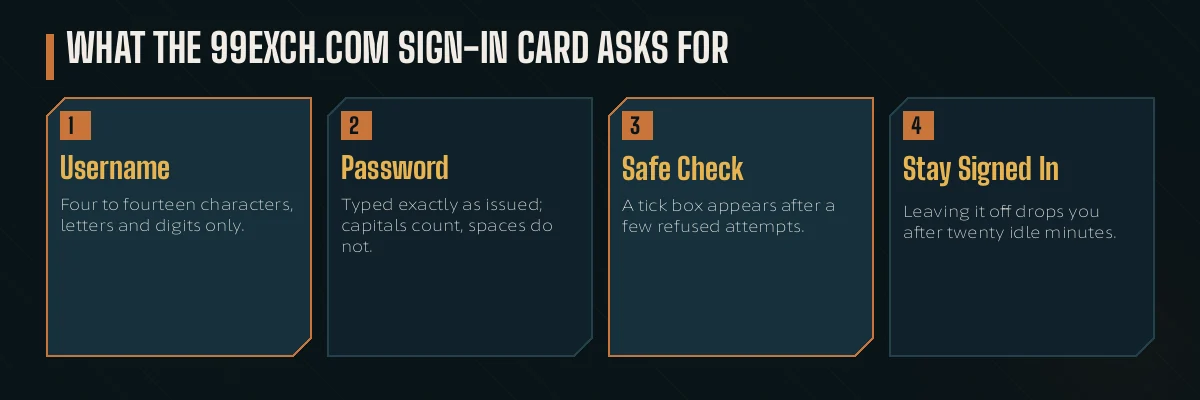
Start with the part most people skip. Every 99Exch com login takes two things, a username and a password, and the refusal that comes back does not say which of the two it rejected, that single missing detail is why readers burn ten minutes retyping a password that was correct the whole time. Split the two before anything else.
Caps and Copied Spaces, the Commonest 99Exch Password Refusal
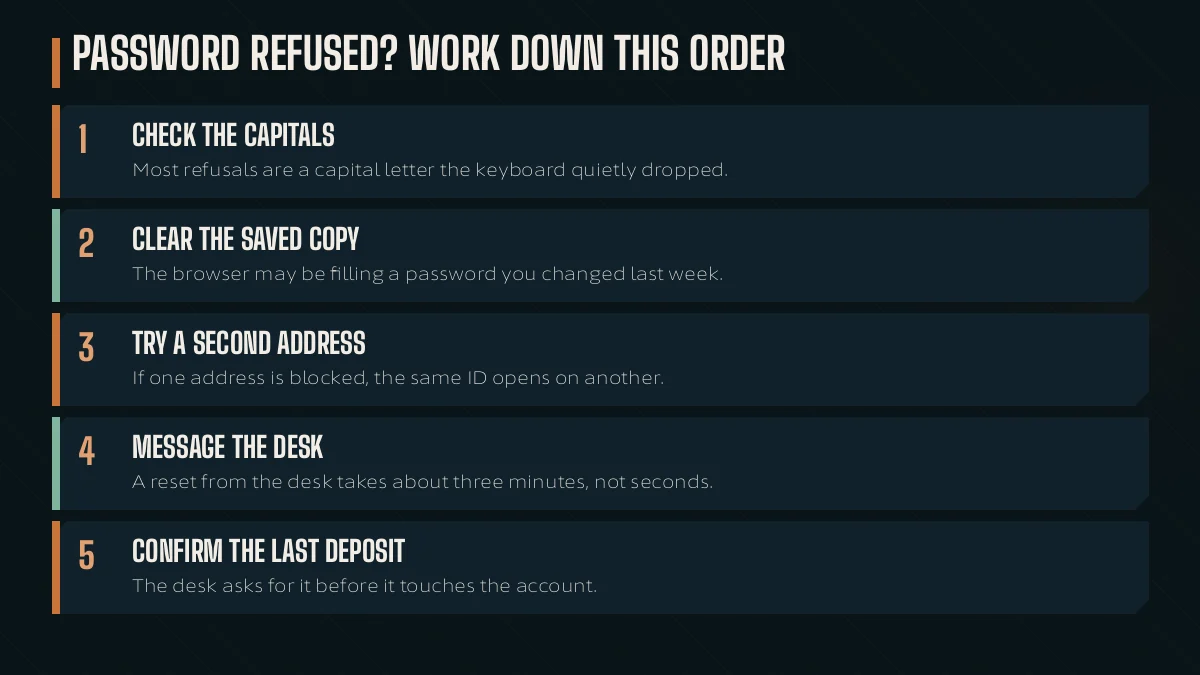
Desk-issued passwords carry capitals, and capitals travel badly between apps. Copy one out of a chat thread on a phone and the keyboard will often grab the trailing space along with it, which the sign-in box reads as a real character you never meant to type. Paste into a plain notes field first, look hard at both ends of the string, then paste it across. More often then not that is the entire fault, and the 99Exch desk never has to be involved at all.
A lowercase first letter is where Android catches people out. The keyboard decides your password is the start of a sentence and lifts it to a capital, and 99Exch, reading every character literally, refuses a string the desk never issued. Switch the suggestion strip off. Type slowly, one character at a time, and if a careful manual entry still bounces, the password itself is probably dead and the reset below is your next stop.
A 99Exch Username Typed From Memory Instead of the Chat Thread
Most of the remaining failures live in the top box. A 99Exch username runs 4 to 14 characters and uses letters and digits only, which rules out the dots, dashes and the underscore people habitually sprinkle into anything username-shaped. Someone who opened their ID eight months ago and types what they believe they picked is guessing, and the board has no way to be kind about a guess.
Households running two accounts hit a sharper version of this. The ceiling is two IDs per WhatsApp number, and once both exist the first username and the second password get paired by accident constantly, 99Exch refuses that pairing in the same words it uses for a wrong password, which sends people hunting for a fault that is really a filing error. Read the two-ID limit on a 99Exch ID before deciding anything broke.
A Clear 99Exch Refusal Checklist Before You Message Anyone
- A capital the phone keyboard added by itself, or a space that travelled along with the paste.
- A username typed from memory rather than read back out of the desk thread.
- An idle session that already closed, so the board is simply asking again, the 20-minute idle rule on the 99Exch login page explains the timing.
- An old bookmark loading an address your ISP stopped serving, which looks like a login fault and is not one.
- The password from your first ID going into your second username, or the reverse.
- A reset the desk already ran, with the old password still sitting in the keyboard history.
Four of those six you clear yourself in under a minute. The other two need the desk. And if the page itself never finished loading, stop treating it as a 99Exch com login problem, check which 99Exch com address is serving today first, because a dead address refuses every password equally.
Https 99Exch Com Login and Play 99 Exchange Password — One Verified String
Both addresses read one credential. Whether you reach 99Exch through the https 99exch com login or arrive searching for a play 99 exchange login password, the second line of the sign-in box wants the exact string issued for your username, since 99Exch (often typed as 99 Exchange) keeps a single password per ID across every address.
Same ID, same balance.
Most people arrive by one of two doors. Some type https://99exch.com into the address bar by hand, and others tap a bookmark saved months ago, and the bookmark is usually the weaker habit, since it keeps loading an address after your ISP has stopped serving it and drags along whatever old password the browser filed next to that tab. Hand-typing shows you where you actually landed. It also means the saved entry has to be picked on purpose, rather than slipped into the box for you. Two IDs on one number? Then each 99Exch username carries its own password, so check the pairing before blaming either door.
- Bookmark opens, password refused: clear the saved entry and type the 99Exch password fresh from the desk thread.
- Hand-typed address shows nothing at all: that is an address problem, so check today's working 99Exch com address before touching the password.
- Both doors open and the refusal stays: the string itself is dead.
That last case is the only one that needs a person. The desk reset described in the next section covers it, roughly three minutes once it starts (the first reply tends to take around four, which is the slower half of the wait), and the new password works through every door above.
99Exch Com Login Password — the Official Reset That Takes Three Minutes
No forgot-password mail. No SMS code, no cooling-off period that lifts the lock by itself, and no screen anywhere on 99Exch that issues a fresh string by itself. So once the username is confirmed good, a 99exch com login password problem has one route and it runs through a person: you message the 99Exch desk, the desk checks the number the message came from, and a working password returns on the same thread about three minutes later.
What the 99Exch Desk Reads First in a Reset Message
Your registered WhatsApp number does most of the work. The desk compares it with the ID before anyone looks at a password, so a request about your username sent from a cousin's phone stalls however polite it is. After that the message needs little: the username, the refusal wording copied off your screen, and roughly when you tried. Replies start near the four-minute median, and the reset takes about three once someone picks it up.
Line the timings up and the desk policy explains itself. A brand-new 99Exch ID comes back in six to nine minutes, and on a busy international evening that stretches towards fifteen while the queue clears. A reset on a username that already exists runs in three whatever the night looks like, because nobody has to choose a username or confirm a first deposit. Add the four-minute median reply and a reset is seven minutes door to door against the better part of twenty for a replacement account. Ask for the reset.
Desk hours are 9 AM to 2 AM IST, every day of the week. That seventeen-hour window covers the whole of an Indian cricket evening and most of the night that follows it, so a locked 99Exch com login at half past midnight is routine rather than a disaster. Anything sent after two in the morning waits for the nine o'clock shift. That display number, +91 81097 11726, sits on the 99Exch com WhatsApp number page with its staffed hours, and it is the only line that resets a password.
If the account needs recovery rather than a plain reset, a number changed, a phone lost, a username nobody can produce — the desk asks for one money detail as well: the amount of your last deposit. Deposits start at ₹100 here, so even a small one counts, and the figure is checked against the record rather than guessed at. It is a crude check that works, which is roughly the best thing you can say about any identity question answered over chat.
After the New 99Exch Password Lands
Sign in once, immediately, while the desk thread is still open. An untested reset is a reset nobody knows about, and the gap between the password arriving and you using it is where the next complaint is born. Type the new string manually the first time instead of pasting it. Then, if the board opens, go back and delete the old password out of your browser's saved list, that stale entry is the single most common reason a 99Exch password refusal repeats itself a day later.
Quick 99Exch Password Decision Tree, Read From the Top Down
Work through the branches in order and stop at the first one that matches your evening. Most readers never reach the bottom. Branches exist because the symptom is always identical, one refusal message, while the causes behind a failed 99Exch com login sit in four completely different places: the address, the username, the session, or the password itself.
- Did the page even open?
Nothing rendered means no password was ever read. India blocks betting addresses at ISP level, so the brand keeps several running and one 99Exch ID carries the same balance across all of them. Switch address first, type second.
- Is the username refused on its own?
Enter the username with a deliberately wrong password. If the the refusal reads the same either way, suspect the top box: 4 to 14 characters, letters and digits, read straight from the chat that issued it.
- Were you signed in twenty minutes ago?
Then you probably met the idle timeout, not a lock. Sessions on the web close after 20 quiet minutes, the 99Exch app holds 45, and the fix is to sign in again with the password you already have.
- Did a reset happen recently?
Everything older than that reset is scrap now, your browser's saved copy included. Clear the entry, then hand-type the newest string out of the 99Exch desk thread.
- None of the above?
Message the desk. Username, the refusal wording, the time. Roughly three minutes later a working 99Exch password comes back on the same thread, and you are on the board for the rest of the match.
One honest limit on all of this. Nobody publishes a number for how many wrong attempts it takes before an account stops responding, and the desk does not announce one either, so treating the third failed try as your cue to stop is just sensible rather than a rule you can quote. Three tries, then chat. That habit has saved more 99Exch evenings than any clever password-manager trick.
Locked Out of 99Exch — Trusted Reopening Without a Second ID
Being locked out feels different from a refusal, and the difference is mostly in your head rather than on the screen. The message is the same. What changes is that repeated attempts stop getting you anywhere, and the sensible response is to put the phone down on the sign-in screen and open the chat thread instead. The desk reopens a 99Exch username; nothing on the site reopens it on a timer.
What the 99Exch Desk Can Reopen, and What It Will Not Do
It can reset the password on an existing username in about three minutes, and it can recover an account when the username itself has been lost, which takes a message from the registered number plus the amount of the last deposit. What it will not do is hand you a third ID as a workaround, because one WhatsApp number carries a maximum of two 99Exch IDs and that ceiling is the policy rather than a soft suggestion. Reopening the username you already own is also where your balance sits, so it is the route you want anyway.
A regular messaged the desk at 11:40 on a Sunday with three failed tries behind him and an unfinished chase in progress. The first reply came in around four minutes, the new password landed inside the next three, and the whole repair cost him less time than the over he had been waiting on. That is a normal night, not a lucky one.
Easy 99Exch Habits That Keep the Next Login Clean
Saved passwords cause most repeat refusals on 99Exch. The browser keeps it's copy of the string the desk replaced and fills it in the following evening, and the refusal that follows looks like a fresh fault when it is the old one. Clear that entry the same minute a reset lands on the chat thread. And keep the newest 99Exch password in one place you control, not only in a chat you might delete.
Two smaller habits help more than they should. Sign in once after every reset, even if you are not planning to bet, so a broken password gets found at nine in the evening rather than at one in the morning when the window is closing. And when a 99Exch session drops mid-match, type the password rather than hunting for a saved one, twenty idle minutes is a session rule and not a sign that your 99Exch com login has gone wrong again.
Last thing, and it belongs here rather than in a disclaimer at the bottom. If a lockout hits in the middle of a chase and the first instinct is to get back in at any cost, that instinct is worth a pause: this is 18+ money, the desk opens again at nine, and a refused password at midnight is an unusually good excuse to stop for the night.
What Readers Ask After a 99Exch Password Refusal — Verified Answers
What should I check before a fourth 99 Exch login attempt?
Hand-type the username and password from the 99Exch desk thread once, with autocorrect off, because most repeat refusals are a phone capital or a pasted trailing space. If that clean manual attempt still fails, stop at three tries and message the desk from your registered number for a three-minute reset.
Is there a 99Exch com id download file for logging in?
No. A 99Exch ID is a username the desk sends over chat, not a file you download. The only download in the picture is the 22 MB Android build, and it asks for the same username and password as the browser does. The ID itself never arrives as a file.
Can I reset a 99Exch com login password myself?
Only through chat. A replacement 99Exch password is typed out by the desk and arrives in the same WhatsApp thread you messaged from, roughly three minutes after they start on it. Anything sent after 2 AM IST waits for the 9 AM shift, so a very late refusal usually becomes a morning fix.
How long does a 99Exch password reset take late at night?
About three minutes once the desk has read your message, and the first reply usually arrives inside four. The 99Exch desk works from 9 AM to 2 AM IST every day of the week, so a 1 AM reset is ordinary. Messages sent after 2 AM wait for morning.
What if my 99Exch username is refused as well?
Then the format is wrong rather than the password. A 99Exch username runs 4 to 14 characters and uses letters and digits only, so a dot, dash or space in what you typed can never match. Read it back from the desk chat instead of from memory.
Why did my 99Exch session end while the match was still running?
Idle time ended it, not a bad password. A 99Exch web session closes after 20 quiet minutes and the app holds for 45, so watching without tapping signs you out. The same password gets you straight back in; session rules sit on the 99Exch login page.
Is a second 99Exch ID quicker than fixing a refused password?
No, the reset wins. A reset on your existing username takes about three minutes, a new 99Exch ID takes six to nine, and your balance stays on the username you already own. One WhatsApp number holds two IDs at most, and a lost username comes back with your last deposit amount.
What should I send the 99Exch desk about a refused login?
Three things: the username, the exact wording of the refusal on screen, and the time you tried. Send it from the number your 99Exch ID was registered on, because the desk matches that number before it touches a password. A screenshot of a bank app is never needed.