
99Exch App — Official Pocket Board Where a Stake Goes On Mid-Over
Ball three of the nineteenth over. The bookmaker price has already shifted twice, and whether your stake lands depends on how fast the screen in your hand reaches the right tab, which is the entire job of the 99Exch app: five sections, a match list that redraws every 8 seconds, and a sign-in that survives 45 minutes of you sitting still.

Inside the Official 99Exch App — the Five-Section Tour, Board Side First
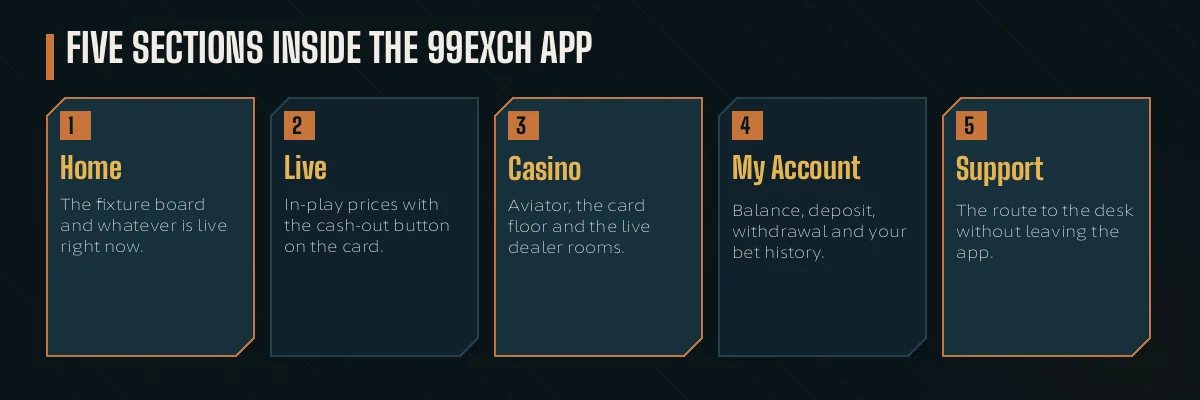
Five sections. Home, Live, Casino, My Account and Support, all reachable without a single scroll, which matters more then it sounds when a market is seconds from suspending. That bar is not ordered alphabetically, and it is not accidental either: the two sections that move money sit away from the two you tap every minute, so a half-awake jab at midnight does not land you on a withdrawal form when you only wanted a price. Spend ten minutes learning the five and the 99Exch app stops feeling like an app at all, it becomes the board you happen to carry.
The three 99Exch app sections you will actually live in
Two of these you will use in every session, one of them you will wander into when the cricket stops. None of the three asks you for anything.
- Home, the corridor, not the roomThe 99Exch app opens here: a sports strip with cricket first and football, tennis and kabaddi behind it, the fixtures starting next, and your balance line along the top. Most regulars pass through Home in about four seconds and never read it properly.
- Live, where the 8-second redraw livesThe in-play board. Prices you are looking at are at most one redraw old, because the match list refreshes every 8 seconds on its own, with no pull-down needed. Which market types appear, how cash-out behaves and how the list is ordered are all set out on the 99Exch live in-play board page rather than here.
- Casino, the lobby that loads under the cricketThird along the bar. On a phone the 400+ titles scroll as a single column with Aviator and Teen Patti close to the top, and the 30+ live dealer rooms are the heaviest thing the app ever loads. Stakes per table and how each game plays are in the play 99 exch game catalogue.
The two 99Exch app sections you open when money or trouble shows up
These two get maybe a minute of your evening, and both are worth knowing before you need them in a hurry.
- My Account, balance, statement, cashierDeposits and withdrawals both start in this section, and so does every argument about a figure, because the statement line here is the record. The minimum that opens a first stake is ₹100. Methods, limits and clearing windows are a separate subject and are not repeated on this page.
- Support, the way back to a humanThis is the handoff. The 99Exch desk reads messages from 9 AM to 2 AM IST, seven days, and the median reply has been running at about 4 minutes; the display number is +91 81097 11726. Send the username and the time of the problem, not just the words not working.
What is missing from the build is worth a line too. No match video, no tips feed, no bonus wheel spinning on the home screen, the 99Exch app is a board and a cashier, and that is the lot. Install detail sits elsewhere as well: 22 MB, an Android 7.0 floor, four taps and a fresh build roughly every 3 weeks are all covered on the 99exch apk download page, so nothing about unknown sources needs repeating here.
The first ten minutes with the 99Exch app, in order
Signing in is not the same thing as being ready, and the order of the next few taps saves a scramble later on. Start in My Account and read the balance line, because a stake with no funds behind it is the single most common thing the desk gets asked about on a Friday night. Then pick the sport you came for on Home, so the 99Exch app opens where you want it instead of wherever the traffic is. Open Live and let it sit through two or three redraws, if the numbers shift, your connection is doing its job. Last, send one short message to the desk thread so it already exists at midnight when you would rather not be starting a conversation from scratch. Four taps, ninety seconds, and the app is set up the way a regular keeps it.
Take all five 99Exch app sections into your pocket tonight
Play 99 Exch App or 99 Exchange App — One Official Android Build
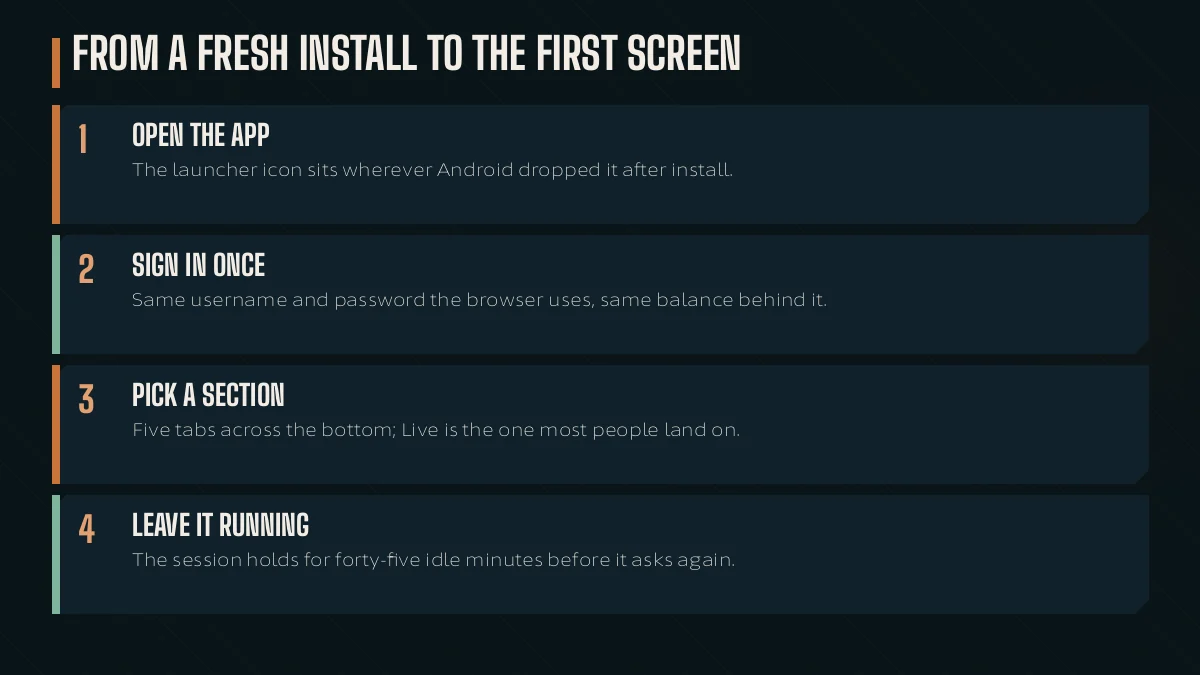
Search play 99 exch app or 99 exchange app and you end up at the same 99Exch Android build: a 22 MB file for Android 7.0 and up that opens on the five-section bar above and asks for the username the desk already issued you, typed into the first of the two launch boxes.
No separate casino app.
- Typed as play 99 exch appMostly by people after Aviator or Teen Patti, and those open from the Casino tab of this one build, no extra download involved.
- Typed as 99 exchange appLong-form spelling of 99Exch, nothing more. Your login card on launch looks exactly as it does for everyone else, two boxes, username first and password second.
iPhone gets no file at all; Safari's Add to Home Screen pins the board as a shortcut and the same username works there too. Android install steps, the unknown-sources prompt included, are on the 99Exch APK install steps page, and a newer build turns up roughly every 3 weeks. Username refused on launch? Send it, with the time, to the 99Exch desk instead of reinstalling.
Live 99Exch App Notifications — What Pings, What Stays Quiet, What You Can Mute
Android asks once, on first launch, and almost everybody taps Allow without reading the box. Fine. But the two senders you deal with are not the same sender: the 99Exch app talks to you about your own account, while the 99Exch desk answers you on WhatsApp, and the permission you just granted only covers the first of those. Mute the wrong one and you can end up staring at a silent phone while the answer you are waiting for is sitting in a chat thread you switched off three weeks ago. That thread is also one of only three entries kept against your name, which is set out in the 99Exch privacy policy.
Account events come from the app, answers come from the 99Exch desk
Anything tied to your own account is the app's department, a balance movement, something settling, a newer build waiting. Anything that needs a person is the desk's: the username after sign-up lands on chat in six to nine minutes, a password reset takes about 3 minutes, and an ID recovery check asks for the registered number plus the amount of your last deposit. Those arrive as ordinary messages between 9 AM and 2 AM IST, median around four minutes, on the same thread you first wrote to.
Small consequence, properly annoying when you get it wrong. If the phone is quiet and the board is fine, check the chat before you check the app.
Muting the 99Exch app without going blind on the board
Android lets you silence one app and leave the rest alone, and the 99Exch app survives that treatment without losing anything you care about. Live does not need a notification to stay current, it redraws every 8 seconds whether or not the phone is allowed to buzz. So turn the app's alerts off during meetings, exams, a flight, whatever, and keep the chat app loud instead, because that is where a desk reply or a reset actually appears.
Something else on this. Nothing in the 99Exch app pushes a prediction, a tip or a sure thing at you, and if a message ever claims to be doing that, it did not come from here.
Which 99Exch app alerts are worth hearing during a chase
Not many. Settled markets and cleared deposits change what you can do next; the rest can wait for morning. Live already tells you most of it by redrawing every 8 seconds, which beats any notification pipeline on a budget handset. So the sensible setting during a run chase is the opposite of what people expect: let the 99Exch app stay quiet, keep your eyes on the board, and let the chat app carry anything that needs a human being. If an alert does land while you are mid-stake, finish the stake, the the notification will still be sitting there afterwards.
A ping is not a confirmation
Treat the statement line in My Account as the truth and the notification as a nudge. Notifications get swallowed by battery savers, doze mode and aggressive task killers on budget handsets, that is Android being Android, not the 99Exch app failing. Once a deposit shows in the statement, it is in, whether or not anything buzzed. When it does not show after the usual window, that is a desk message, and it should carry the time, the amount and the method.
Fast, Light 99Exch App Data Use — Odds Text First, Studio Video Last
No megabyte figure here, because yours would be wrong. What the 99Exch app pulls depends almost entirely on which of the five sections you are parked in, and the gap between the cheapest and the dearest is wide enough that an average would mislead you. A text board is cheap. A dealer table is not.
Where the data actually goes inside the 99Exch app
Live is numbers and labels, nothing heavier. Every 8 seconds it asks the server what changed and redraws; over a two-hour chase that is a great many tiny requests and very little weight in each one, which is why the board usually holds up on a train when video would have given up. Casino is the other end of the scale, 30+ live dealer tables carry a feed from a studio, and a feed costs what a feed costs. Home, My Account and Support barely register at all.
Anyone counting every rupee of a prepaid pack can run the 99Exch app as a cricket-only tool: stay on Live, keep Casino for the Wi-Fi at home, and the daily number stays small.
When the 99Exch app looks frozen but your connection is fine
Prices that stop moving for a good deal longer than one redraw usually mean one of two things, and only one of them is the network. Second possibility is the clock: 45 minutes of no activity ends the app session quietly, and a dead session looks exactly like a dead board. Switch tabs and come back; if the numbers still refuse to move, sign in again. Field names, the idle rules and the stay-signed-in behaviour are documented on the 99exch login page.
Patchy signal, trains and roaming
Weak line, simple rules. Stay on the Live tab, because text survives a bad cell where video stalls. Keep the casino lobby for a proper connection. And close the 99Exch app rather than leaving it open in the background for an hour, since you are only going to come back to an expired session anyway, and reopening is faster then arguing with a frozen screen.
Handover deserves a line of its own. Walking off the Wi-Fi at home onto mobile data in the middle of a session does not sign you out of the 99Exch app, but the board can sit on one stale set of numbers while the connection changes hands, and that pause looks far more alarming than it is. Give it 8 or 10 seconds. Once the next redraw lands, nothing was ever wrong.
Easy 99Exch App Housekeeping — the Mid-Over Stake, the Idle Clock and a Shared Phone
A stake that goes on mid-over is mostly a question of preparation rather than thumb speed. Whatever price is in front of you is at most one 8-second redraw old, so the board is rarely the bottleneck; the bottleneck is a balance that is not there yet, or a session that ended while you were watching the ball. Have the money in before the innings break, keep the Live tab open rather than coming in through Home, and know roughly what you are putting on before the bowler walks back, that part is on you, and the app will not do it for you.
One reader messaged the desk at 11:40 at night, certain the 99Exch app had died in the middle of a chase: the numbers had stopped moving and the stake box would not take a figure. It was the idle clock. He had opened the app before dinner, left the phone on the table, and come back about 50 minutes later to a session that had quietly ended. Sign in, board alive, nothing lost but the over.
The 45-minute idle clock on the 99Exch app
Forty-five minutes of nothing and the app signs you out. Web is stricter at 20 minutes, which surprises people who assume the phone is the tighter of the two. Neither number is a punishment; it is just a session ending on a device you might have put down in a restaurant. Useful habit: sign in when you sit down to watch, not hours earlier.
Two 99Exch IDs on one phone
One WhatsApp number carries a maximum of 2 IDs, and the app holds one of them signed in at a time, so running both means signing out and back in. Usernames are 4 to 14 characters, letters and digits only, which is enough room to make the pair easy to tell apart, a sensible move if one is yours and one belongs to a brother who keeps borrowing the handset.
A shared phone and the notification shade
On a handset other people pick up, mute the 99Exch app and keep chat previews off the lock screen, because the balance line and a desk reply are the two things you would rather not have read aloud at a family dinner. Nothing in the app ever displays the password itself; if you think somebody has seen it, the desk replaces it in about 3 minutes, which is faster than any argument about who looked.
Keeping the 99Exch app and the web board in step
There is one account behind both screens, so nothing needs reconciling: a stake placed on the phone turns up in the web statement, and a cash-out taken on a laptop shows on the handset the next time the 99Exch app refreshes. Same ID, same balance, same statement, whichever screen you are holding. Best habit here is reading the statement line once at the end of a session rather than three times during it, because the board is for prices and My Account is for records, mixing those two up is how people talk themselves into a 1 AM panic message about a figure that was always correct.
Install, updates and iPhone, one line each
Android: 22 MB, 7.0 and up, four taps, and a newer build appears roughly every 3 weeks, the whole install story, including the unknown-sources prompt, lives on the APK page linked above. iPhone: there is no APK and there never was one; Safari adds the board to the home screen as a shortcut, and it behaves like the app apart from the icon's origin. If you have not picked up an ID yet, the 99Exch cricket odds board explains what the brand is and which address does what. Speed is the whole point of a pocket board, and that speed is exactly why it pays to fix your own limit before the toss, 18+ only.
Three Fast 99Exch App Answers Before You Open the Board
Where does the 99Exch app download apk file come from?
From the 99Exch sign-in screen itself, never from a forwarded file or a random search result. The 22 MB build, the Android 7.0 floor and the four install taps all sit on the 99Exch APK page, so this page sticks to what the five sections do once the icon is on your home screen.
Will a 99Exch deposit made on a laptop show up on my phone?
Yes, because there is only one 99Exch balance. Put ₹100 in through a browser tonight and that ₹100 is already sitting on the balance line when you open the app tomorrow, statement rows matching one for one. What differs is the idle limit, 45 minutes on the phone against 20 on the web.
Can I open a 99Exch ID from inside the app?
No, the app carries no sign-up form in it at all. A username reaches you on chat after the desk takes four details, usually inside six to nine minutes and up to fifteen when an international match is on, and that username is what the two boxes on launch are waiting for.